
Task queues and assignment
Published
Everything the warehouse does is a task: pick, pack, ship, receive, put away, replenish, transfer, cycle count. They all behave the same way, which means learning one queue teaches you all of them.
Tasks in the sidebar opens them, one queue per type.
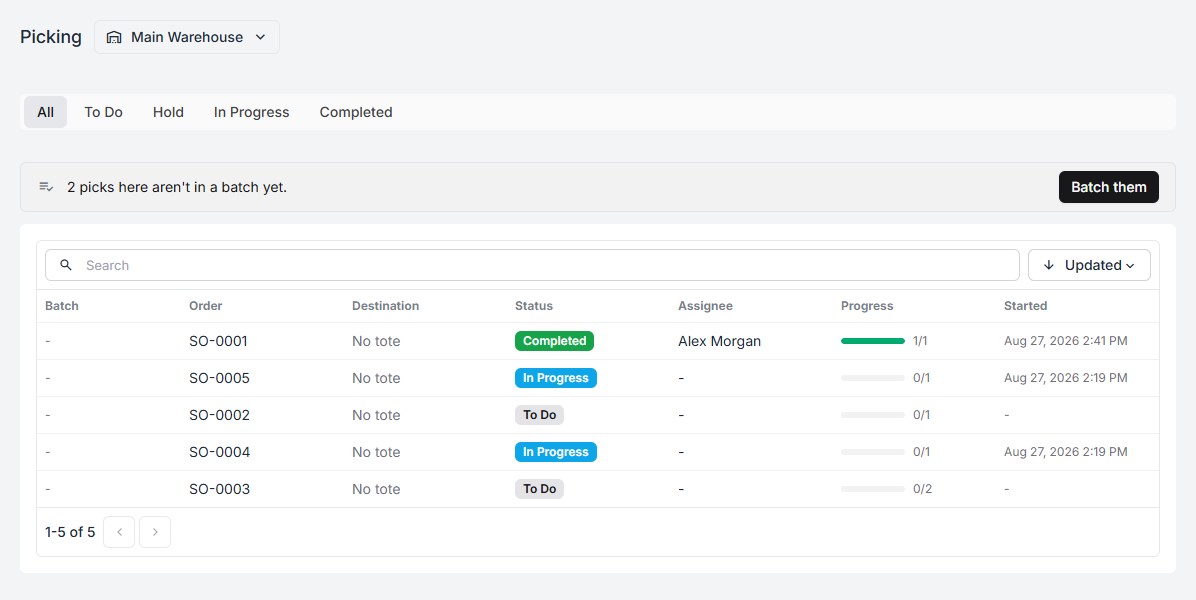
The tabs
Section titled “The tabs”All · To Do · Hold · In Progress · Completed
| Status | What it means |
|---|---|
| To Do | Created, nobody has started it |
| In Progress | Someone started it |
| Hold | Paused part-done — waiting on a person, not on a queue |
| Completed | Finished |
Hold is the one to watch. A task on hold is not in anybody’s queue and will not be picked up by the next person free. Somebody has to come back to it, and if nobody does, an order sits. See short picks and other problems.
The columns
Section titled “The columns”They vary a little by task type, but the shape is constant: what the task is against (the order or PO number), where it is going, its status, who has it, how far along it is, and when it started.
An empty Assignee with a status of To Do is available work.
How tasks are created
Section titled “How tasks are created”Almost never by hand. Tasks are created by the events that need them:
- A paid order creates a pick task.
- Finishing the pick creates a pack task.
- Buying a label creates a ship task.
- Marking a purchase order as ordered creates a receive task.
- Finishing the receive creates a put-away task.
- A pick face falling to its trigger level creates a replenish task.
- Submitting a transfer creates a transfer task at the origin.
The chain matters more than any single link. If a task type never appears, the question is usually about the step before it, not about the queue you are looking at.
Assignment
Section titled “Assignment”A task can be pushed or pulled:
- Pulled — a worker opens the queue, takes the next task, and starts it.
- Pushed — a supervisor assigns it from the queue, the board, or the task itself.
Which of these your floor uses is set per warehouse by the directed workflow switch, under warehouse settings. With it on, workers are told the next step instead of choosing.
Small experienced teams usually do better pulling; large or new teams do better being directed.
Batching
Section titled “Batching”Where several picks can sensibly be walked together, the queue offers it:
2 picks here aren’t in a batch yet. Batch them
See batch picking for when that is worth doing and what totes have to do with it.
Where else tasks show up
Section titled “Where else tasks show up”- The outbound board and the inbound board — the same tasks as cards in columns.
- The warehouse dashboard — counted per stage.
- Productivity — counted per person.
- An order’s own Tasks tab — everything that has been raised for that order.