
The queues in picking, packing, and shipping each show one stage. The outbound board shows all of them at once.
Warehouses → Outbound.
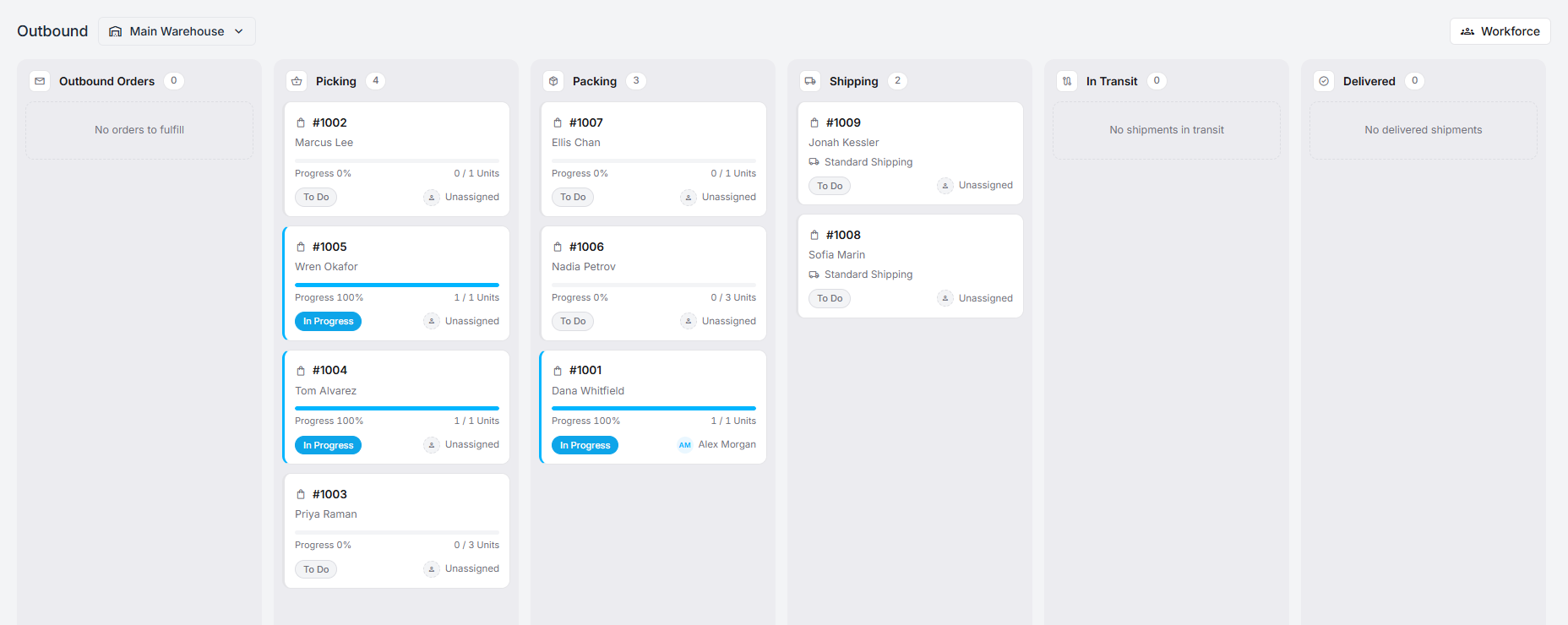
The columns
Section titled “The columns”Outbound Orders → Picking → Packing → Shipping → In Transit → Delivered
Each card is one order, and carries what a supervisor needs at a glance: the order number, the customer, a progress bar with units done against units required, the task’s status, and who it is assigned to.
Shipping cards show the delivery method — Standard Shipping, or local delivery, or pickup — rather than a unit count, because at that point the units are already in a box.
Reading it
Section titled “Reading it”Read down the columns, not across. The useful signal is where cards accumulate:
- Picking full, packing empty — the floor is the constraint. More pickers, or a layout that walks less.
- Packing full, shipping empty — the bench is the constraint, or labels are not being bought.
- Shipping full and static — parcels are packed and nobody has handed them to a carrier.
A card at Progress 100% still sitting in its column has finished its work and is waiting for someone to close it out. That is the cheapest work on the board.
Assigning
Section titled “Assigning”Unassigned on a card means nobody has taken it. The more_vert menu on each card assigns it, and Workforce at the top opens the other side of the same question: who is here, and how many active tasks each of them has.
Between the two, an unbalanced afternoon takes about a minute to even out.
The inbound twin
Section titled “The inbound twin”Warehouses → Inbound is the same board for goods arriving — Inbound Orders, Receiving, Put Away, Done, plus the optional QA, Staging, and Repackage columns. See receiving stock.
Board or queue?
Section titled “Board or queue?”Both are useful, for different people:
- The board is for whoever is running the floor. It shows the whole day.
- The queues are for whoever is doing the work. They show one stage, with the next task ready to open.
The board is not where picking happens. It is where you notice that picking is not happening.