
The warehouse dashboard
Published
Where the home screen is about the business, this one is about a building. Warehouses → Dashboard shows what is happening on one floor, right now.
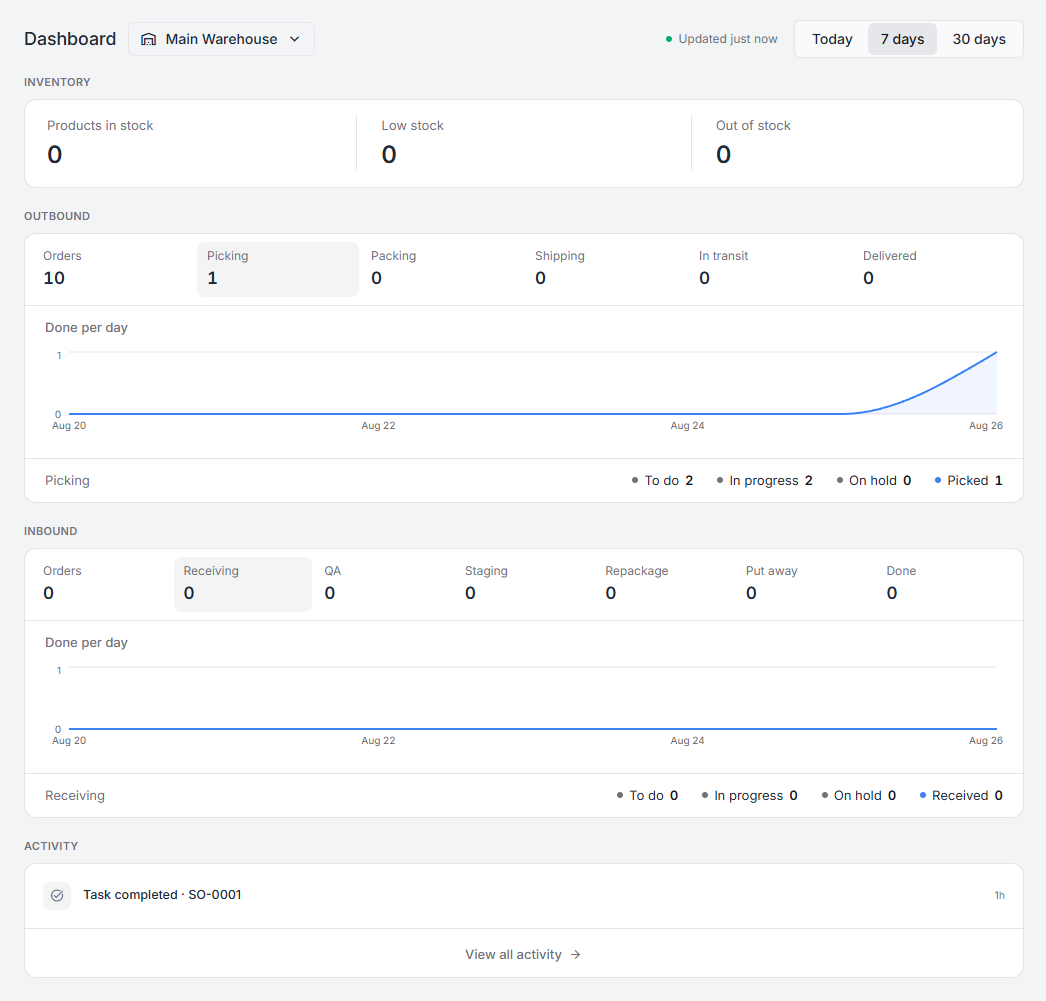
The warehouse picker sits next to the title, and Today · 7 days · 30 days sets the window. “Updated just now” tells you how fresh the numbers are.
Inventory
Section titled “Inventory”Three counts across the top: products in stock, low stock, and out of stock. Low and out of stock are the two that should be near zero, and each is a list you can open.
Note that products with quantity tracking switched off are not counted here — there is no quantity to be low on. See inventory overview for what Track Qty does.
Outbound
Section titled “Outbound”The row of counts follows an order out of the door:
Orders → Picking → Packing → Shipping → In transit → Delivered
Read it as a pipeline. Work piling up in one column and nothing in the next is the signal — twelve in Packing and nothing in Shipping means the bench is the constraint this afternoon, whatever the totals say.
Below it, Done per day plots completed work across the period, and a status strip breaks the current stage down into To do, In progress, On hold, and Picked.
On hold deserves attention. A task goes on hold when someone paused it rather than finished it — a short pick, a problem reported, a shift that ended. Held work is not queued for anyone; somebody has to come back to it. See short picks and other problems.
Inbound
Section titled “Inbound”The same shape, for goods arriving:
Orders → Receiving → QA → Staging → Repackage → Put away → Done
QA, Staging, and Repackage are optional steps. If your warehouse does not use them they sit at zero and receiving hands straight to put-away — see receiving stock for how those steps are turned on.
Activity
Section titled “Activity”The most recent things that happened in this warehouse, newest first, each with how long ago. View all activity opens the full history.
This is the panel to open when something looks wrong and you want to know what touched it.
Reading the dashboard well
Section titled “Reading the dashboard well”Two habits make it useful rather than decorative:
- Compare columns, not totals. The number that matters is where work stopped, not how much there is.
- Check On hold every day. Nothing else on this screen is waiting for a human to decide something; held tasks are.