
The home screen
Published
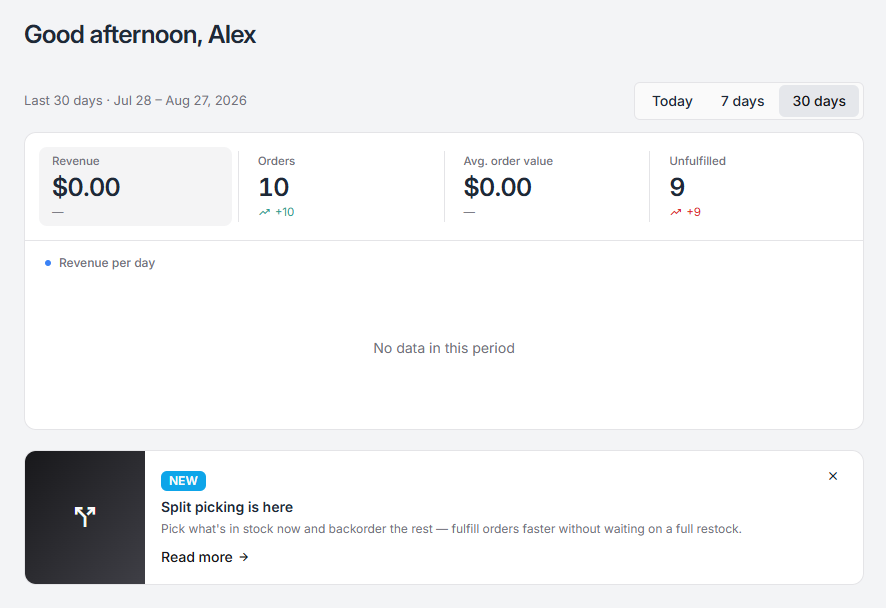
Home is the first screen after sign-in and the one you land on from the Fiftify logo. It answers a single question — how is the business doing? — for whichever period you choose.
The period
Section titled “The period”Today · 7 days · 30 days, at the top right. Everything below reads from the selected period, and the range is spelled out underneath the greeting so there is no ambiguity about which thirty days.
The four numbers
Section titled “The four numbers”| Tile | What it counts |
|---|---|
| Revenue | The value of orders in the period |
| Orders | How many orders came in |
| Avg. order value | Revenue divided by orders |
| Unfulfilled | Orders still waiting to go out |
Each tile carries a comparison against the previous period of the same length — an arrow and a difference. Thirty days against the thirty before it, today against yesterday. A dash means there is nothing to compare against yet.
Unfulfilled is the one that behaves differently from the others: it is a backlog, not a total, so it goes up when work arrives and down when work is finished. A rising arrow there is not good news.
The tiles are clickable — each opens the list of records behind it, so a surprising number can be inspected rather than guessed at.
Revenue per day
Section titled “Revenue per day”Below the tiles, the same revenue plotted across the period. A flat line with “No data in this period” means exactly that: no orders carried value in that window.
What home is not
Section titled “What home is not”Home is company-wide and commercial. It does not know or care which warehouse you have selected in the header.
For the operational view — what is in picking right now, what is waiting to be received, who is working — use the warehouse dashboard, which is scoped to one building.