
Insights and stock signals
Published
“Low stock” is not a fact about a shelf — it is a judgement, and it depends on how fast a product sells. Settings → Insights is where you make that judgement explicit, once, so every screen in Fiftify applies the same one.
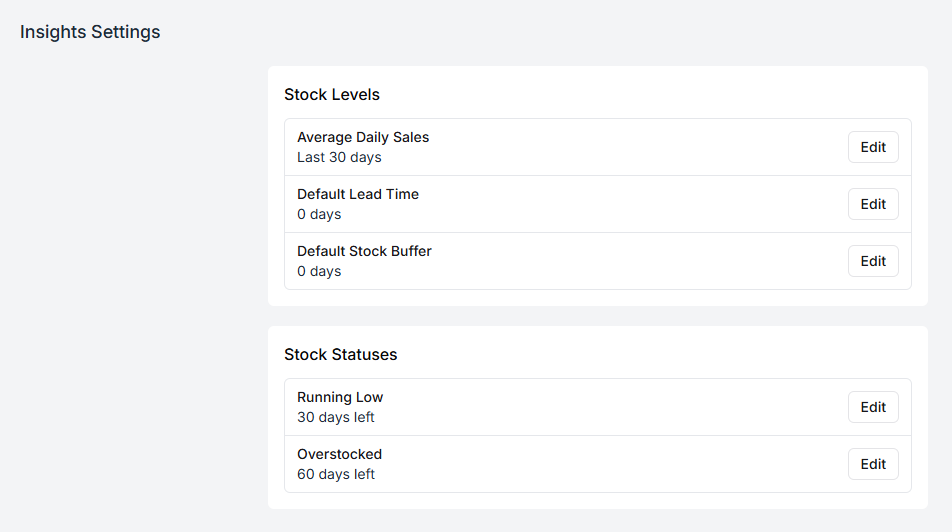
Stock levels
Section titled “Stock levels”Average daily sales — the window Fiftify averages over, Last 30 days by default. Units sold in that window, divided by its length, gives a product’s daily sales rate. Shorten the window and the signals react faster to a change in demand; lengthen it and they stop twitching at one good week.
Default lead time — how many days a replacement typically takes to arrive. A product’s primary supplier can carry its own lead time (see suppliers), and that wins where it is set; this figure is the fallback for everything else.
Default stock buffer — the safety margin, in days, you want left when a delivery lands. Zero means planning to run out exactly as the replacement arrives, which no real delivery schedule survives.
Stock statuses
Section titled “Stock statuses”Everything below is measured in days of cover — the stock available in a warehouse divided by that daily sales rate. Two thresholds turn it into a badge:
Running low — 30 days left by default. At or below this, the product is flagged.
Overstocked — 60 days left by default. At or above this, you are holding stock that is not moving.
Days of cover is the right unit precisely because units are not comparable. Two hundred units is comfortable for a slow mover and a crisis for a fast one; “eleven days left” means the same thing for both.
A product can land on one of six statuses:
| Status | What it means |
|---|---|
| Healthy | Cover sits between the two thresholds |
| Running low | Cover at or below the Running low threshold |
| Overstocked | Cover at or above the Overstocked threshold |
| Out of stock | Nothing available and nothing incoming |
| Stock gap | Nothing available, but a delivery is on its way |
| No sales | Nothing sold in the window, so cover cannot be worked out |
No sales is not a warning. A product nobody bought this month has no sales rate, and dividing by it would be meaningless — so Fiftify says so instead of inventing a number. New products sit here until they start selling.
Stock gap is the one to act on: you are out, and the replacement has been ordered but has not landed. Nothing more to order; something to tell a customer.
Choosing your numbers
Section titled “Choosing your numbers”Start from what actually happens rather than what you would like:
- Lead time: the worst normal delivery, not the best one. If a supplier usually takes ten days but took twenty in December, December is what the buffer covers.
- Buffer: enough days to notice the alert, place an order, and have it picked up. A buffer shorter than your own ordering cycle cannot work.
- Running low: comfortably more than lead time plus buffer, so the alert lands while you can still act on it.
- Overstocked: high enough that seasonal stock does not trip it every year.
Where the signals show up
Section titled “Where the signals show up”On the products list and on product pages as status badges, on the warehouse dashboard as the Low stock and Out of stock counts, and in the reorder view described in inventory overview.
Change a number here and every one of those screens changes with it — which is why the setting lives in one place rather than on each product.