
The listings list
Published
Every connected channel gets its own page under Sales Channels in the sidebar. It opens on that channel’s listings: one row per item the channel is selling.
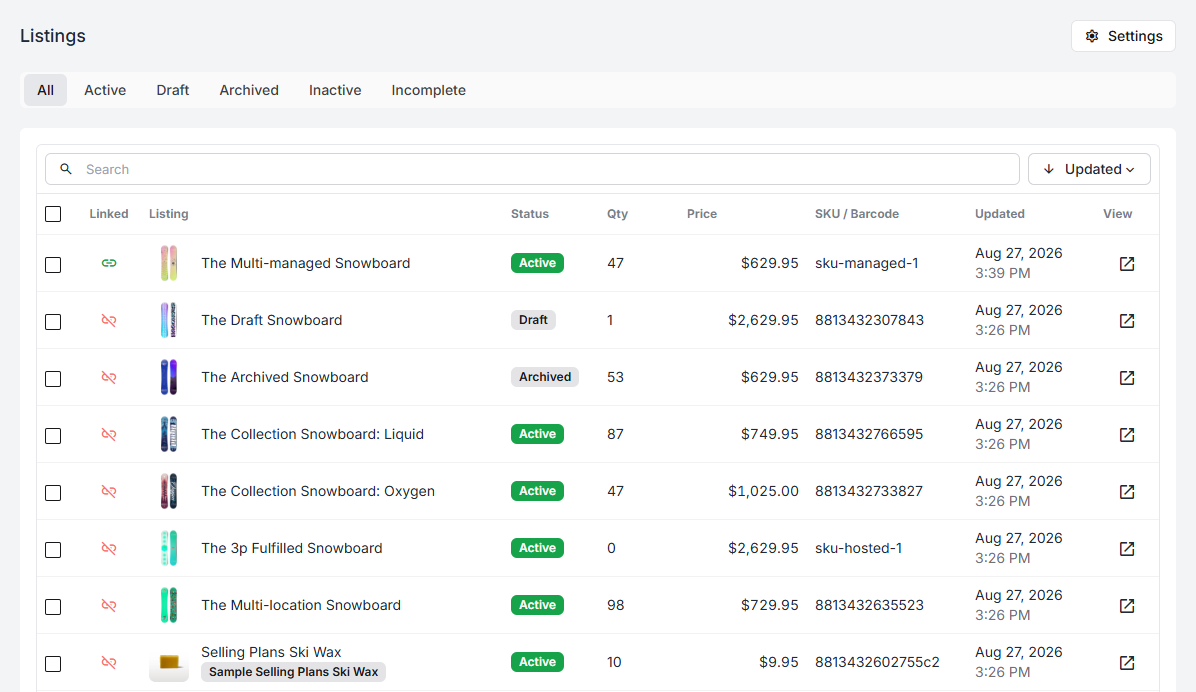
The columns
Section titled “The columns”| Column | What it tells you |
|---|---|
| Linked | Whether this listing is attached to one of your products |
| Listing | Title and image, as the channel has them |
| Status | The channel’s own status for the listing |
| Qty | Units the channel believes are available |
| Price | The listing price |
| SKU / Barcode | Whichever identifier the channel supplied |
| Updated | When the listing last changed |
| View | Opens the listing on the channel itself |
The Linked column
Section titled “The Linked column”This is the column that matters most on a new connection. A green link means the listing is attached to a product, so its stock is counted, committed, and picked like anything else you hold. A struck-through link means it is not — Fiftify can show you the listing but has nothing behind it.
Everything a fresh import brings in starts unlinked. Working down this column is the job described in link a listing to a product.
Status tabs
Section titled “Status tabs”The tabs above the table filter by the channel’s status:
- Active — live and for sale
- Draft — not published yet
- Archived — retired on the channel
- Inactive — present but not selling
- Incomplete — missing something the channel requires
These statuses belong to the channel, not to Fiftify. A draft listing stays a draft until you publish it on the channel’s own admin; Fiftify reports it, it does not decide it.
Searching
Section titled “Searching”Search matches the listing title, SKU, and barcode. The sort control switches between recently updated, title, and price.
Sorting by Updated is the useful default while a connection is fresh: the rows that changed most recently are the ones a sync has just touched.
Selecting a row opens the listing on its own, with its quantities per location, its suppliers, and its adjustment history — see the listing page.
Variants
Section titled “Variants”Channels that sell variants — sizes, colours, finishes — send each variant as its own listing, because each one has its own SKU, price, and count. A parent product with five variants arrives as five rows, and each is linked separately.