
Company settings
Published
Settings → General holds the two things that apply to your whole company, whatever warehouse you are standing in.
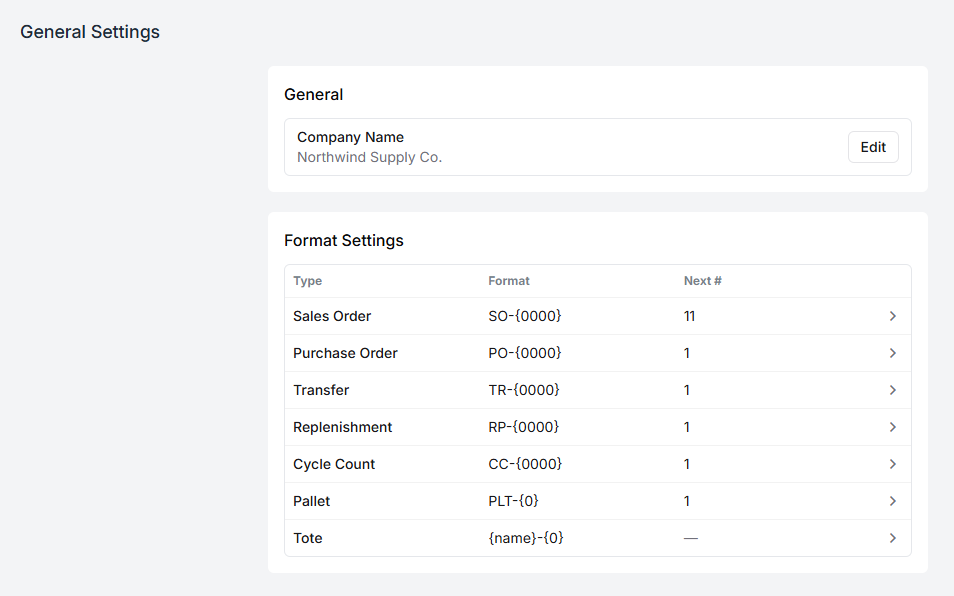
Company name
Section titled “Company name”This is the name on your account. It appears on the documents Fiftify prints — packing slips, delivery slips, purchase orders — so it should be the name your customers and suppliers recognise, not an internal shorthand.
Numbering formats
Section titled “Numbering formats”Every document Fiftify creates gets a number, and this table decides what those numbers look like:
| Type | Example format | What it numbers |
|---|---|---|
| Sales Order | SO-{0000} | Orders, however they arrive |
| Purchase Order | PO-{0000} | What you order from suppliers |
| Transfer | TR-{0000} | Stock moved between warehouses |
| Replenishment | RP-{0000} | Top-ups from bulk to a pick face |
| Cycle Count | CC-{0000} | Counts of a set of bins |
| Pallet | PLT-{0} | Pallets |
| Tote | {name}-{0} | Totes |
The Next # column shows the number the next document of that type will get.
Reading a format
Section titled “Reading a format”{0000} is a counter padded to four digits — SO-0001, SO-0002, and so on up
to SO-9999 and beyond. {000} pads to three, and {0} is the same counter with
no padding at all. A format can also carry the date: {YYYY} for the four-digit
year, {YY} for two, and {MM} for the month. PO-{YYYY}-{0000} produces
PO-2026-0001.
Anything outside the braces is copied through as typed, which is where the SO-
and PO- prefixes come from.
Changing a format
Section titled “Changing a format”Select a row to edit it. A change applies to documents created afterwards; numbers already issued stay as they are, because they are printed on paper and quoted in emails.
Two habits worth keeping:
- Keep the prefixes distinct.
SO-andPO-next to each other on a screen should never be mistakable for one another. - Do not reuse numbers. If you lower the counter, Fiftify will happily issue a number that already exists, and two different documents will answer to it.
Tote numbering is the odd one out: {name}-{0} builds the code from the tote name
you type plus a counter, so a batch of totes named TOTE comes out as TOTE-1,
TOTE-2, TOTE-3.