
Inventory → Products is your catalog: one row per product you stock, however many channels sell it.
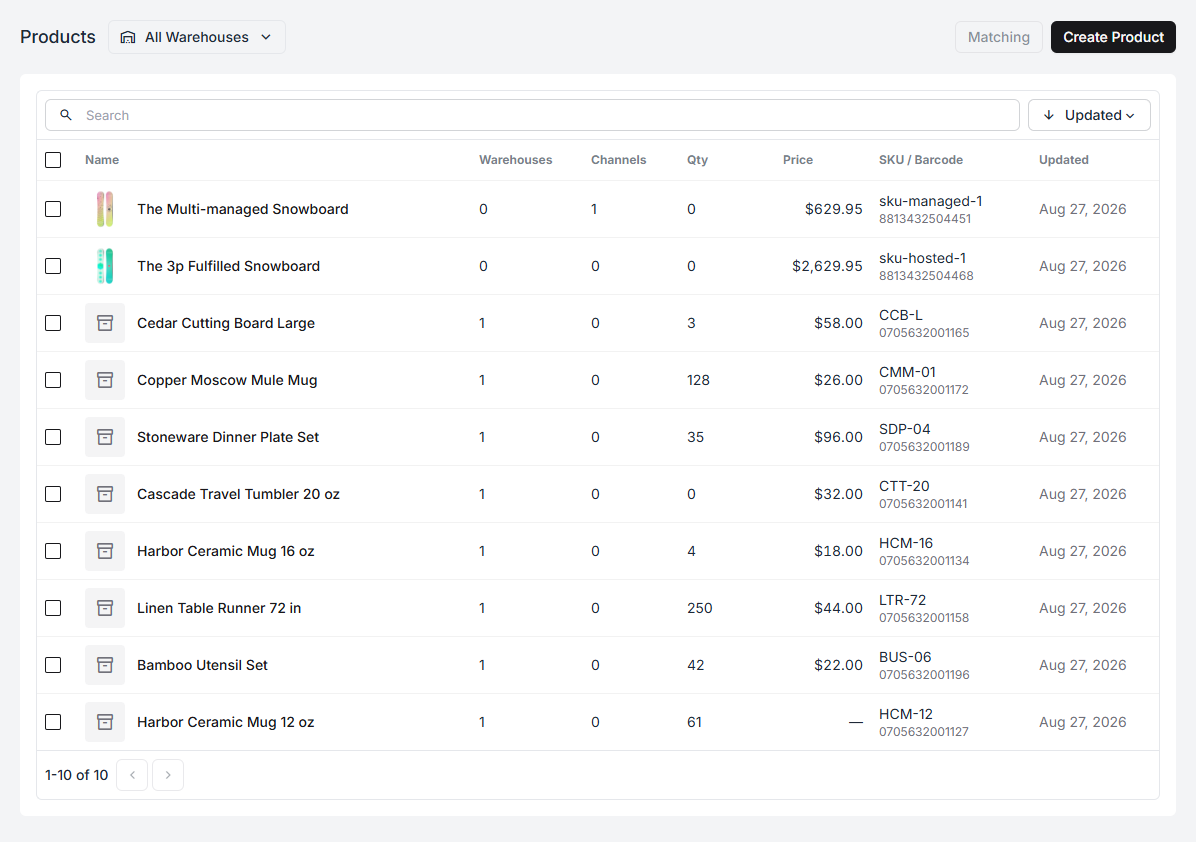
| Column | What it tells you |
|---|---|
| Name | The product |
| Warehouses | How many warehouses hold it |
| Channels | How many channel listings are linked to it |
| Qty | Units on hand |
| Price | Selling price |
| SKU / Barcode | Its identifiers |
| Updated | Last change |
Products vs listings
Section titled “Products vs listings”The Channels column is the one worth understanding. A product is yours; a listing is how a channel shows it. One product can back several listings — the same mug on Shopify, eBay, and Etsy — and that is exactly the point: one pile of stock, counted once, sold in three places.
A product with 0 channels sells nowhere yet. A listing with no product is stock
Fiftify cannot count. Both are fixed the same way, from
link listings to products.
Two ways products appear
Section titled “Two ways products appear”- Imported — created automatically when a channel’s listings are pulled in.
- Created by hand — Create Product with a name, SKU, and barcode, for anything you hold but do not sell online yet.
Searching
Section titled “Searching”Search matches name, SKU, and barcode. The sort control switches between recently updated, name, and quantity — recently updated is the useful default while you are actively editing the catalog.
SKUs are the backbone
Section titled “SKUs are the backbone”Almost everything downstream keys off the SKU: matching listings, picking, counting, purchase orders. A product without one still works, but it drops out of every workflow that has to identify goods on a shelf. Give everything a SKU, and keep them unique.
Next: create and edit a product, then the product page for what its other four tabs do.